Drafts and confirming
Everything that goes into a brief arrives as a draft and stays a draft until you confirm it. This page is about that gap, because it is the part of the brief system that most looks like an unnecessary step and most is not.
The two states
Section titled “The two states”A draft is content sitting in a block’s form. What the parser or the agent wrote is saved, and so is any picture you attach: leave the page and come back and both are still there. Words you type into a draft are not saved until you confirm, so confirm before you leave. A draft is read by nothing. No prompt sees it. The Prompt Agent does not know it exists.
Confirmed is content in the brief proper. It is what prompts read.
Confirm is the button that moves the first into the second. It is the only thing that does.
The four states a block can be in
Section titled “The four states a block can be in”Read them off the badge row on the brief page, or the summary card on the project page:
| State | What it means |
|---|---|
| Empty | Nothing here. Nothing has been parsed or drafted yet. |
| Draft | Something is waiting for you to read it. Nothing is live. |
| Confirmed | Live. Prompts read this. |
| Confirmed, draft pending | Live content, plus something newer waiting. Prompts still read the confirmed version. |
That last one is the one to watch for. It happens when you re-parse a block that was already confirmed, or when the Brief Agent proposes a revision to something you had settled. Your prompts carry on using the old confirmed content (which is right, nothing changed under you) but there is a newer version waiting and it is easy to walk away and forget.
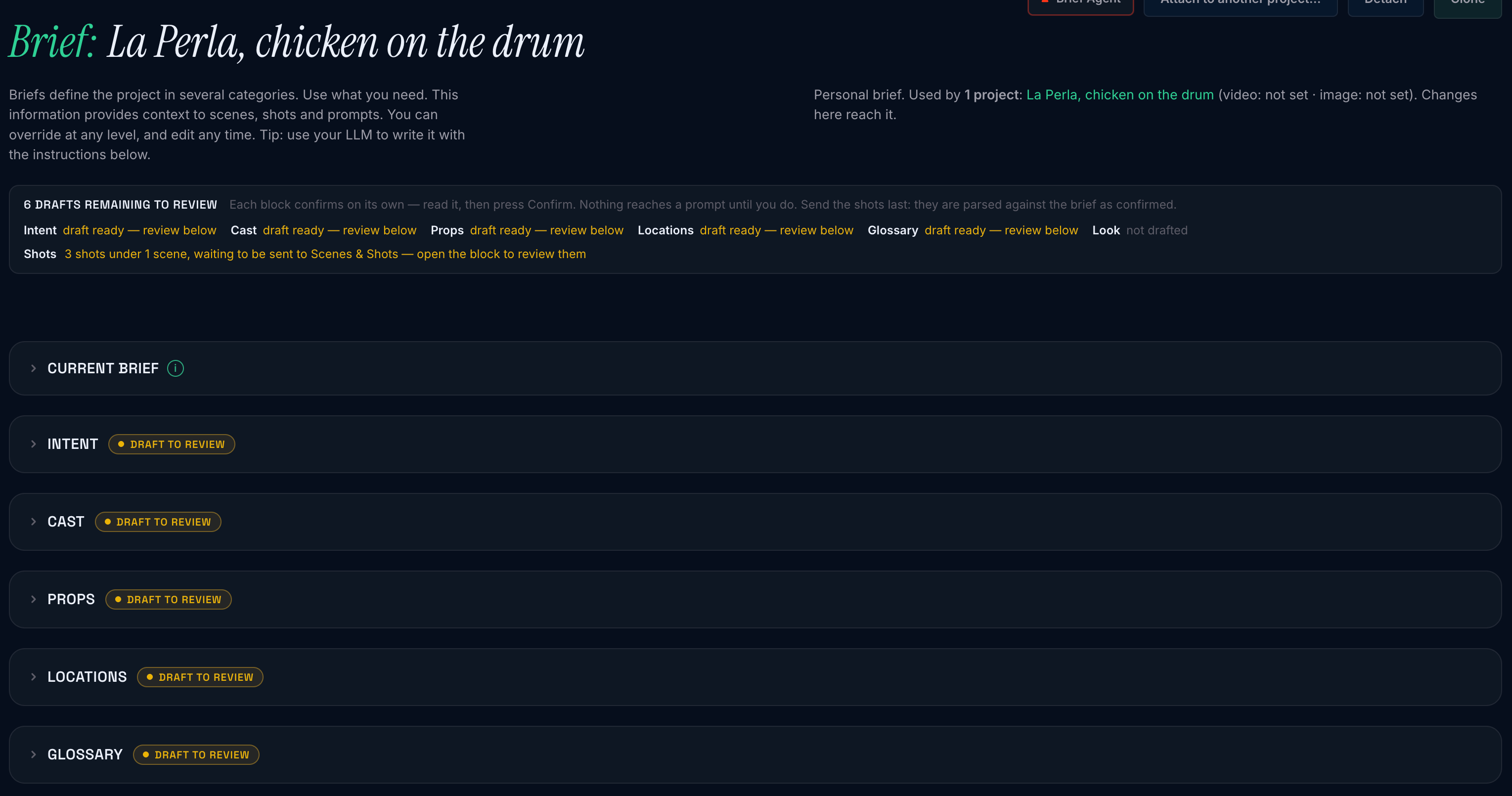
After entered, the first thing you will see are draft blocks that need review.
Important: Look is chosen rather than written, so most of the time it has only two states: empty or set. It has one draft path. Attach a reference picture to the Look block and ask the Brief Agent to propose from it, and its Lighting, Emulsion, Grade and palette land as a proposal on the Look block, a draft you Apply or Discard. Applying merges the proposal over what is set; discarding writes nothing, so a Look you chose is never cleared by turning a proposal down.
Finding what is waiting
Section titled “Finding what is waiting”Every block on the page is a disclosure: closed by default, opened by its heading. Whether you left one open is remembered per tab, so confirming or parsing does not shut the block you were reading.
Three things point at a waiting draft so it is not lost behind a closed block:
- a Draft to review button on the block’s heading, which opens it;
- the review strip at the top of the page, 2 drafts remaining to review, with one line per block: not drafted, draft ready, nothing here, confirmed, reviewed and left empty, parsing, or failed;
- the Brief Agent’s opening line, which names any draft waiting before it asks you anything.
When the last draft is dealt with the strip says Review pass done, with nothing left to review, and retires. It counts drafts remaining, never “complete”: a brief is never finished; a review pass is.
Nothing confirms for you
Section titled “Nothing confirms for you”There is no auto-confirm. There is no “this one looks confident, we will just apply it”. The document parser cannot confirm a block. The Brief Agent cannot confirm a block. Ask it and it will tell you so itself, correctly.
This is not caution about quality. It is worth stating plainly what confirming actually does.
A confirmed block is not a note to yourself. It becomes standing instruction for the production: every prompt written in that project afterwards is written to agree with it. A sentence you confirmed without reading is a sentence that quietly shapes forty shots.
Confirming is the only place anybody looks at that content before it starts doing that. A person reading a draft and choosing it is the difference between “a document I have not read closely” and “the rules for this production”.
So reviewing is the point, not a formality. Read the draft. It is worth the minute.
What reviewing actually involves
Section titled “What reviewing actually involves”Drafts arrive marked. Anything the source did not actually state is shown with a dashed edge and the word guessed, and the mark clears the moment you edit the field.
That is the fastest way to review a draft: look at the guessed cells first. They are where the system inferred something from context, often correctly, sometimes not, and they are exactly the fields that will be wrong in an interesting way. A location’s anchor read off a phrase like “the white tower at the pier end” is usually right. A character’s age read off nothing at all is usually not.
The unmarked fields came from your source verbatim, and generally need only a glance.
Edit freely before confirming. The draft is a starting point, not a proposal you accept or reject wholesale. Change a word, delete a character you do not need, add one the document never mentioned. What you confirm is what you are looking at, not what arrived.
Pictures stay put when the words are redrafted. Attach a picture to a character, a prop or a location and it is saved to the draft the moment it lands. Re-draft the block from the document, upload a new document, or let the Brief Agent revise it, and the pictures stay on every entry whose name comes back unchanged. An entry that comes back under a new name starts without them. The confirmed block does not change until you press Confirm.
Confirming an empty form clears the block. That is how you remove something you have decided against: empty the fields, confirm, and the block is empty again. The one exception is a Look proposal, which has Discard instead, because clearing the Look would throw away choices you made, not the proposal.
What happens when you confirm
Section titled “What happens when you confirm”The block goes live and its badge fills in. Prompts written from that moment read it.
Shot prompts you already wrote do not change. A prompt is a piece of writing, not a live query: confirming a new Cast entry does not go back and rewrite last week’s shots. If you want an existing shot prompt to reflect a newer brief, open it and ask the agent to revise it.
A confirmed entry can make its own reference. Once a block is confirmed, each entry carries Create shot prompt. One press makes the reference row on Scenes & Shots, mints the prompt and composes it. A character also offers Create N shot prompts for its reference sheet, counting what you tick. This is the answer to “how do I get a picture of this character to hold the others still?”, and it is on the brief because that is where you are when you want it.
The shots are not a block, and they do not confirm here. A shot list inside the document you uploaded is set aside and sent to one project once every block is confirmed. See Sending the shots.
Reference prompts are the exception, and you are asked. When you confirm a Cast, Props or Locations block, any reference prompt composed from that entry’s earlier wording is now out of date, so the page offers to compose those again and names them. It only offers. Nothing is rewritten until you press, and a prompt you have edited in the Studio still asks whether to keep your version.
A note on what is never stored
Section titled “A note on what is never stored”A field nobody stated is left out, not filled with a placeholder. You will not find “Not specified” or “Unknown” sitting in a brief field, because a placeholder becomes real data the moment something reads it: a character whose accent is the literal string “not specified” is worse off than one with no accent recorded at all.
If a field comes back empty, that is the system telling you the source did not say. Fill it in yourself, or leave it: both are honest.