Midjourney parameters
Midjourney takes its instructions as flags on the end of the prompt. The Studio
gives you the controls and writes the flags, so the compiled prompt is always
valid and you are never debugging a typo in --stylize.
The three sliders
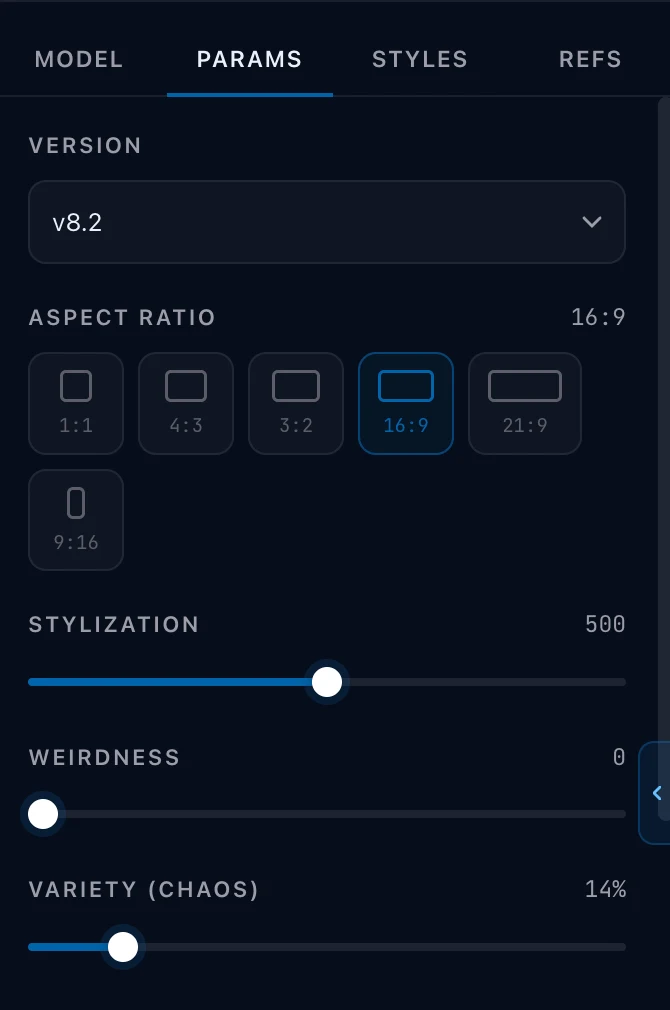
Section titled “The three sliders”Stylization is how much of Midjourney’s own aesthetic to apply. Low values follow your words closely and look plainer. High values look more like “a Midjourney picture” and drift further from what you asked for. This is the control that changes an image most, and the one worth moving first when a result is close but wrong in feel.
Weirdness is how far to push toward the unusual. It is not a quality control; it is a strangeness control. Leave it at zero for commercial work and reach for it when a shot is competent and boring.
Chaos is how different the four results in a batch are from each other. Low chaos gives you four variations on one idea, which is what you want when you are close. High chaos gives you four ideas, which is what you want when you are still looking.
Chaos costs you nothing and can save a lot of time early. It is the one people forget exists.
Version
Section titled “Version”Midjourney’s model versions behave differently enough that a prompt tuned for one is not tuned for another. The newest is the default.
Changing version changes which reference kinds you are offered. The versions do not all take the same ones: where a version does not offer Omni Reference, Lorvara offers Character Ref instead, and the panel shows whichever applies. The style-version control is offered only on versions that publish values for it. See References.
Aspect ratio
Section titled “Aspect ratio”Set here, sent as a flag. It is the same aspect ratio the rest of the Studio uses (one field, whichever model you are on), so switching from Midjourney to another model keeps the shape you chose and changes only how it is expressed.
Quality, mode and speed
Section titled “Quality, mode and speed”Quality trades render time against detail.
Standard and Raw are two different interpretations of your prompt. Raw applies less of Midjourney’s own judgment: closer to what you typed, further from what Midjourney thinks you meant. It suits product and documentary work; Standard suits everything Midjourney is famously good at.
The panel writes no flag for Quality or for Standard and Raw yet, so neither changes the compiled prompt.
Relax, Fast and Turbo are how your Midjourney subscription is billed, not a
quality setting. They change what you wait and what you spend on Midjourney’s
side. Lorvara is not charging for them. Fast is the default and writes no
flag; Relax and Turbo write --relax and --turbo.
The rest of the panel, and the flag each writes
Section titled “The rest of the panel, and the flag each writes”Everything the panel writes, so you can recognize it in a compiled prompt. You never type these.
| Control | Flag | Written when |
|---|---|---|
| Version | --v (or niji’s own) |
always |
| Aspect ratio | --ar |
always |
| Stylization | --s |
always |
| Weirdness | --w |
above zero |
| Chaos | --c |
above zero |
| Speed | --relax / --turbo |
unless Fast |
| Personalization | --p |
when on, with your code if you gave one |
| Exclude | --no |
when you list words |
| Tile | --tile |
when on |
| Draft | --draft |
when on |
| Style reference | --sref (+ --sv) |
per attached style reference; --sv only with a style code, on versions that take it |
| Character / Omni / Image prompt | --cref / --oref / --iw |
per attached reference |
Order is not yours to choose and does not need to be. Lorvara writes them in the order Midjourney documents.
What to read next
Section titled “What to read next”- Copy for platform — how these flags are written out, and what happens on other models.
- References — Midjourney’s four reference slots.
- The Studio — the panel these controls live in.