The Studio
A Key Prompt is text plus everything it needs to run again. The Studio is where you see all of that at once and change any of it.
Studio basics
Section titled “Studio basics”The compiled prompt is the center. What the model will actually receive, composed from your brief, model selection, parameters, styles and references.
Key Prompts recognize the mode. The Prompt Agent recognizes and understands the brief associated with a prompt, the mode, the model, the parameters, the styles and the reference images, and composes a prompt quickly and properly to save you time and wasted generations. Switching between image and video re-drives both the prompt and the parameters, because a prompt written for an image model is not the same string aimed at a video model.
Generate in the Studio or your own tools. In-app generations are saved in the prompt Library.
The Studio and the Library are a pair. Both act on the same object, this Key Prompt, which is why they share a color, and why the active pill is what tells you which one you are looking at.
Naming a reference as you type
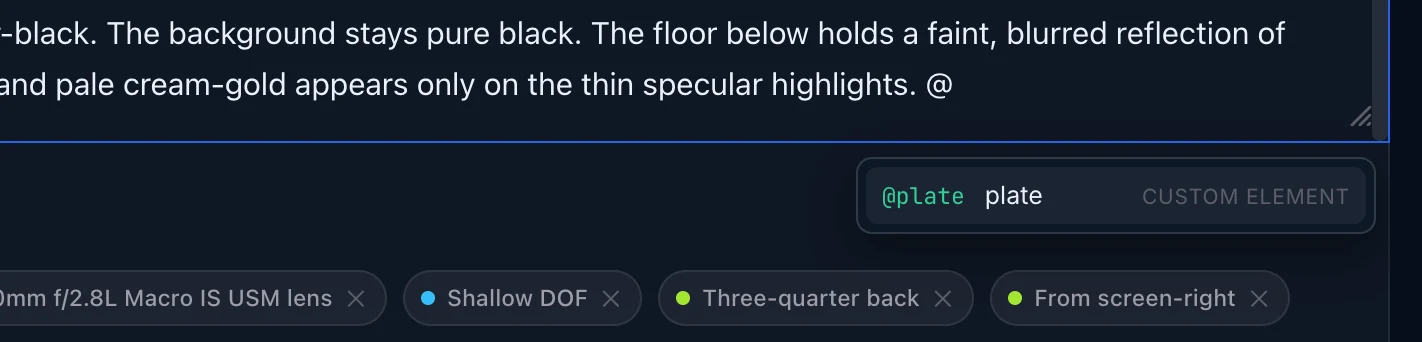
Section titled “Naming a reference as you type”Type @ in the prompt box and a list opens just under it. It holds two
things: references attached to this prompt that you have named, and the
cast, props and locations in your brief that have a picture on file.
Attaching a picture is not enough on its own. Until it has a name, typed in the field under its thumbnail, it is not in the list.
If nothing opens, nothing is broken: there is nothing to offer yet. The list stays shut rather than opening empty, which is also why an email address never summons it.
- ↑ and ↓ move through it, Enter or Tab inserts, Escape dismisses it.
- Picking one writes the picture’s name (
@ivo-renk,@the-mast), never a position. You do not have to remember whether this model wants@Element2or@Image2, because the prompt does not hold either: the model’s own token is written when the request is sent, from the list the request actually carries. That is what lets the same prompt open on another model without an edit. - Picking a reference from your brief that is not yet attached attaches it in
the same keystroke, as its role: a character picture as a character, and so
on. The panel’s Attach new references to decides where new pictures go; left
alone it is the role, which is what lets you name the picture and address it as
@name. Every list the model offers is one choice away in the same menu.
It only triggers where an @ starts a word, so an email address or a filename
like hero@2x.png types normally.
For a deeper understanding
Section titled “For a deeper understanding”Nothing about the Studio is per-project state. It is the prompt’s own surface. Project-level decisions (brief, scenes and shot list) live on the project page and provide context to the Prompt Agent that composes the final prompt for you.
Changing a Key Prompt in the Studio changes that Key Prompt, and only it. If a change is meant for every prompt in a given project, it belongs in the brief; if it is meant for one particular generation, it belongs at the prompt level.
What to read next
Section titled “What to read next”- The Library — where the results live.
- How a prompt is assembled from a shot — what the composed text is made of.
- The model picker — Usable against All Models, and prompt limits.
- How do Skills work? — what decides how the prompt is written.