Reference images
Four blocks take pictures: Cast, Props, Locations and the Look. The first three are the difference between describing a face and showing one; the fourth is the picture a grade is decided from.
Where they attach
Section titled “Where they attach”Cast takes pictures per state, in up to five views: front,
three-quarter, face, profile and back. face is head and
shoulders square to camera; profile is the ninety-degree turn. Five slots per
state, so a character with two states has up to ten.
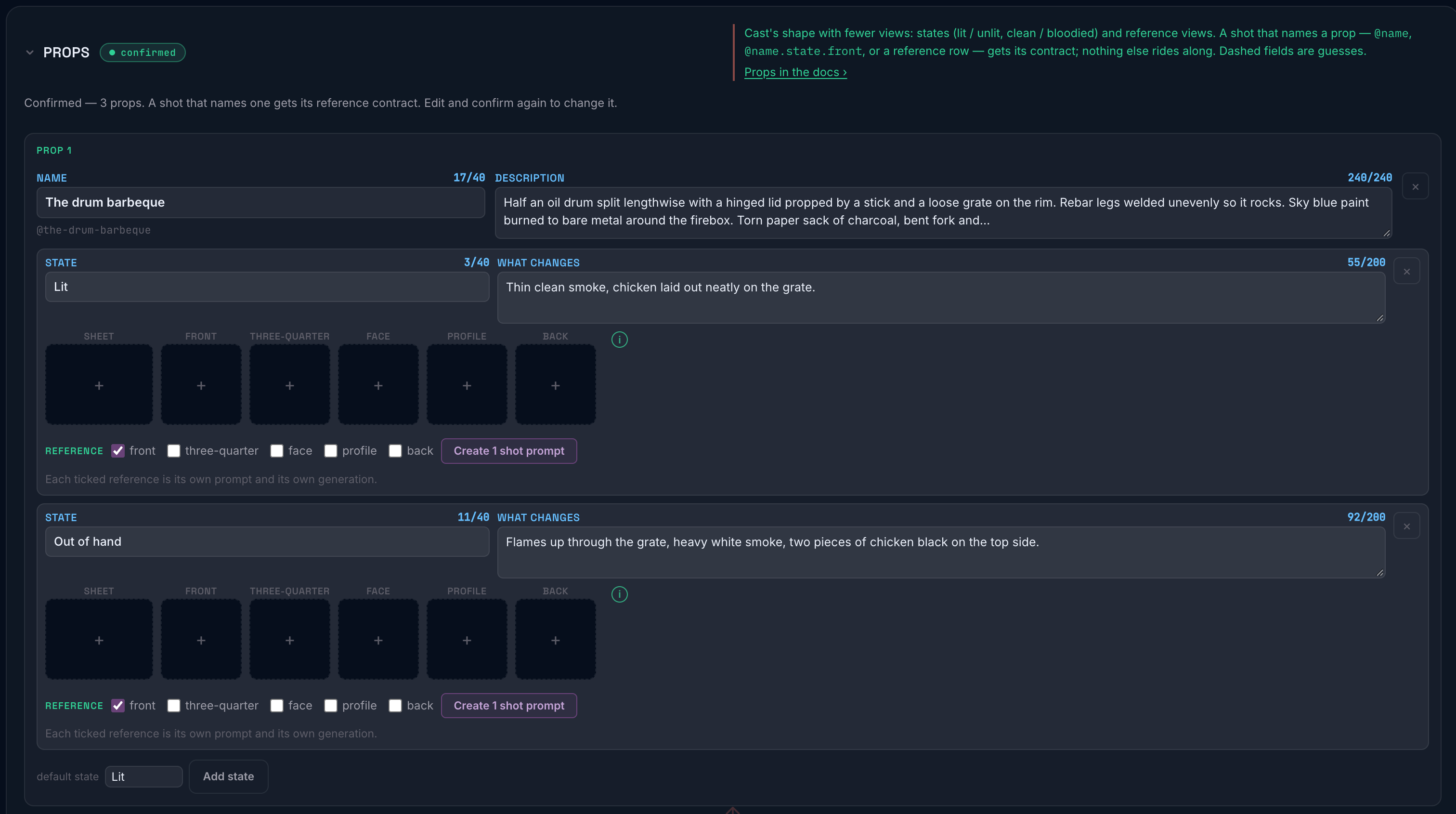
The five views are a fixed set rather than a free-for-all because they map onto what a generation model can actually use. A front and a three-quarter of the same person, in the same state, is a substantially better reference pair than four flattering three-quarters.
A state can also carry a reference sheet, one image that is itself a four-view turnaround (front, three-quarter, profile, back of the same person). A state can hold a sheet and views together. Nothing is dimmed and nothing has to be removed first; which of them a given shot uses is decided per shot, and that is the subject of What a shot receives below.
Props work the same way: per state, same slots, same sheet.
Locations take plates: up to two pictures of the place, each with a short label.
The Look takes up to four references: pictures that show the light, the stock and the palette you are after. They sit beside the Look rather than inside it (they are inputs to choosing the Look, not part of what prompts read) and they are what the Brief Agent proposes a Look from. See Look references below.
A state with no pictures still works. It falls back to its written description, which is why the descriptions in The blocks matter even when you have photographs.
What a shot receives
Section titled “What a shot receives”What you store and what a shot gets are two different things, and this is where people are caught out.
A shot receives one picture per reference it names. Name a character once
and one picture goes. Name her twice with two angles, @anna.child and
@anna.child.face, and both go, each at its own position, so a sheet and a
face can both reach one generation when the shot asks for both. Naming the
same picture twice sends it once. Nothing is sent that the shot did not name.
Over the model’s cap, the references are trimmed in the order the shot named them, the first ones attach, and the row says which were not sent. Trim the shot’s References and recompose, or change the project’s default model.
What each name gets:
| What the shot names | What it gets |
|---|---|
An angle you have on file: @anna.child.face |
That view |
| An angle you do not have on file | The sheet, if there is one; otherwise the first view on file, in front, three-quarter, face, profile, back order |
No angle, just @anna |
The sheet, if there is one; otherwise the first view on file, in that same order |
| A character with no pictures at all | Nothing. The written description goes on its own |
Read the middle two rows together and the rule falls out: the sheet is the state’s whole reference, and it answers any shot that does not name an angle you have. A view stands in for an unnamed angle only when there is no sheet.
This is why the shot type decides which reference is used. A wide or a
two-shot names no angle, so it gets the sheet, which is the right answer,
because the sheet shows the character from every side and the model can take
what the framing needs. A close-up that asks for @anna.child.face gets the
face, because you asked for it by name. The same cast, the same pictures, two
different references, decided by what each shot asked for.
Locations are the exception. A location is not one picture: its plates attach in full, up to two.
Combinations, and what each gets
Section titled “Combinations, and what each gets”- A sheet and a view in one generation. Name both (
@emmy.childand@emmy.child.face) and both go, each at its own position. Name only one and only that one goes. - Two angles of the same character in one shot. Both go, in the order you named them. The same angle named twice goes once.
- An angle you never filed. Naming
@emmy.child.profilewith no profile on file does not fail; it quietly falls back to the sheet, or to the first view you do have. If a shot is not using the angle you expected, check whether that slot is actually filled.
Separately from all of this: some models take more references than others, and some take none. If a shot names more people than the chosen model can carry references for, the pictures are dropped and the shot tells you so, but the written descriptions still go through, so the shot is still specific. You lose the photograph, not the character.
Giving pictures to the Brief Agent
Section titled “Giving pictures to the Brief Agent”You can attach pictures to a message in the Brief Agent. Up to five per message, in the usual formats; each is resized to 1568 pixels and re-encoded in your browser before it is sent, so file size on disk does not matter.
The agent numbers every picture (#1, #2, in the order you attached them) and describes what is actually there. When a picture shows a character’s or a prop’s state, or a place, it cites the picture by number in the draft: as that state’s front, three-quarter, face, profile or back view (it says which, and marks the view as a guess if it could not tell), as a state’s sheet when the picture is a four-view turnaround, or as a location’s plate. When you apply that draft, the cited picture is stored under the brief and becomes that entry’s reference. A picture the agent did not cite is looked at and discarded, because it was you explaining, not the production’s reference material.
Look references
Section titled “Look references”On the Look block, the References row takes up to four pictures. They save on their own; the Look’s choices are untouched by adding or removing one.
Each reference has propose a Look. It opens the Brief Agent with that picture attached to your next message, and for that one turn the agent is given the Lighting, Emulsion and Grade catalogs to pick from. Send the message (“propose a Look from this” is enough) and it comes back with a proposal: catalog choices for Lighting, Emulsion and Grade, three palette colors named in plain words, and a line on what in the picture led to each. The proposal lands on the Look block for you to Apply or Discard; the agent sets nothing itself. Anything it names that is not in the catalog is left out rather than mapped to the nearest thing, so what you see is what will be set.
What it can read from a picture
Section titled “What it can read from a picture”Usefully well, in causal terms rather than adjectives: where the light is coming from and what it does to the subject, the architecture and materials of a place, what somebody is wearing and how it sits, a plausible camera position. Shown a photograph of a harbour it will pick out the white tower at the point as an anchor and describe the tiering of the buildings behind.
What it cannot
Section titled “What it cannot”It cannot tell you what is not in the frame. A picture of a face says nothing about height or build. Ask for those and you will get either a question or a guess marked as one.
It cannot read reality out of a stylized picture. Shown an illustration or a poster, it will describe the composition, and it will tell you that it is a stylized image and says nothing reliable about how real light behaves there. That is the right answer, and it means an illustration is a decent composition reference and a poor lighting reference.
It cannot know which parts you meant. If a picture has a figure in it and you wanted the building, say so. It has no way to tell what you were pointing at.
It cannot resolve a disagreement between a picture and your text. If you say the coat is oilskin and the picture shows a dinner jacket, it reports the disagreement rather than picking a side. That is deliberate. You know which one is right; it does not, and quietly choosing would hide the error.
It cannot invent from a blank or broken image. If an upload has gone wrong and the picture is empty, it will say the image is blank rather than write a description anyway.
It cannot connect two pictures unless you connect them. Two photographs of the same person are two photographs until you put them on the same character’s card.
Practical advice
Section titled “Practical advice”- A front and a three-quarter beat four of anything. Different angles carry more information than more of the same one.
- Plates want the anchor in frame. A location plate that does not include the thing that identifies the place is a picture of somewhere.
- Say what you want read. “Ignore the figure, I want the building” costs you six words and saves a wrong entry.
- Write the description as well. Pictures are dropped when a model cannot take them; the description never is.